Introducing astro-erudite v2

I've rebuilt my blogging template from scratch, and it's better in every way I know how to measure.

Introduction
On September 10, 2024
After I released astro-erudite, I stepped away from open-source for a while to work on my personal business
When I recently used this project as the base for some client work, I soon realized how many fundamentally poor decisions I’d made when initially creating it. My tastes had changed and my opinions had shifted so drastically that I felt the project was no longer serving its original purpose: to be my Phillips screwdriver. I decided to rebuild it from a fresh folder.
What you are now looking at is the culmination of all the lessons I’ve learned throughout my years as a design engineer. I apologize for not getting to this quicker and I regret having shipped out such a subpar project. This blog post will explain the fundamental issues I had with the original version, and how the new version addresses them. Later on I’ll also talk about breaking changes, and how to convert existing v1 projects into v2.
Benchmarks
The description of this post claims that v2 is better in every way I know how to measure, so here are the measurements. Both versions were benchmarked with the same blog posts on the same machine, with v1 pinned to v1.6.3:
| v1 | v2 | Δ | |
|---|---|---|---|
| JavaScript shipped | 334.4kb | 6.9kb | |
| Largest JavaScript file | 174.4kb |
2.6kb |
|
| CSS shipped | 106.5kb | 30.3kb | |
| Homepage transfer size | 480.3kb | 238.5kb | |
| Homepage requests | 14 | 8 | |
| Homepage main-thread work | 0.19s | 0.08s | |
| Series read: page loads | 6 | 1 | |
| Series read: transfer | 1.52mb | 1.03mb | |
| Build time |
7.2s | 3.5s | |
| Build time |
360ms | 194ms | |
| Direct dependencies | 34 | 15 | |
| Installed packages | 782 | 318 | |
node_modules size |
334mb | 273mb |
The series rows measure reading every post of the v1 release series end to end. v1 needs a full navigation per subpost, while v2 renders the whole chain as one continuous page.
Gripes, remediations
The format of this blog post will be simple: I will first talk about something I dislike, and then I will talk about how I got rid of it. If I used to like it, I will talk about what changed my mind.
Regarding dependency hell
In general, a good statistic that quantifies the “weight” of a project is its dependencies. This is only natural. astro-erudite v1 (which I will now just call v1 for brevity) had 34 direct dependencies
Note
In terms of the full tree, a fresh bun install reports 782 installed packages for v1 versus 318 for v2. A bare astro install is 195 packages on its own, and @astrojs/check drags in another 82, so the part of the tree I actually chose and control is 41 packages.
The following is our package.json diff showing the changes:
"dependencies": { "@astrojs/check": "^0.9.4", "@astrojs/markdown-remark": "^6.3.1", "@astrojs/markdown-satteri": "^0.3.2", "@astrojs/mdx": "^4.2.6", "@astrojs/react": "^4.2.7", "@astrojs/rss": "^4.0.18", "@astrojs/sitemap": "^3.7.3", "@expressive-code/plugin-collapsible-sections": "^0.42.0", "@expressive-code/plugin-line-numbers": "^0.42.0", "@iconify-json/lucide": "^1.2.26", "@tailwindcss/vite": "^4.0.7", "@types/react": "19.0.0", "@types/react-dom": "19.0.0", "astro": "^5.7.13", "astro": "^7.0.2", "astro-expressive-code": "^0.40.2", "astro-icon": "^1.1.5", "class-variance-authority": "^0.7.1", "clsx": "^2.1.1", "github-slugger": "^2.0.0", "hast-util-select": "^6.0.4", "hast-util-to-html": "^9.0.5", "hastscript": "^9.0.1", "lucide-react": "^0.469.0", "patch-package": "^8.0.0", "radix-ui": "^1.3.4", "react": "19.0.0", "react-dom": "19.0.0", "rehype-external-links": "^3.0.0", "rehype-katex": "^7.0.1", "rehype-pretty-code": "^0.14.1", "remark-emoji": "^5.0.1", "remark-math": "^6.0.0", "satteri-expressive-code": "^0.1.15", "tailwind-merge": "^3.3.0", "tailwindcss": "^4.1.7", "temml": "^0.13.3" "typescript": "^5.8.3"},"devDependencies": { "@astrojs/check": "^0.9.10", "@biomejs/biome": "^2.5.1", "typescript": "^6.0.3" "prettier": "^3.5.1", "prettier-plugin-astro": "^0.14.1", "prettier-plugin-astro-organize-imports": "^0.4.11", "prettier-plugin-tailwindcss": "^0.6.11"}We can divvy our removed packages into four categories:
- Things that existed to render HTML that I could have totally done myself.
react,react-dom,@astrojs/react,@types/react,@types/react-dom,radix-ui: I’ve completely removed shadcn/ui from this project. I basically was only using<Avatar>,<ScrollArea>, and<Pagination>, which we can own ourselves for much cheaper. Ownership is a principle that I now really enjoy, and even though shadcn/ui kind of claims “ownership” as its leading philosophy(you are, after all, copying the components yourself) , these come baked in with Radix and Lucide and so you don’t really own anything(this says a lot about our society) . There’s absolutely no point bundling these.lucide-react,astro-icon,@iconify-json/lucide: These are icon libraries that shadcn/ui was also using. I’ve learned to opt out of these icon libraries(which are more DX than anything) and to simply have SVGs in anicons/folder with the ones we actually use.
- Things that existed to manage and fix issues with other things shouldn’t have existed in the first place. These are all things that don’t actually do anything to the website, but rather do things to each other.
tailwind-merge,clsx,class-variance-authority: These are utility libraries that all mutate and fiddle around with Tailwind in specific ways. These are now entirely useless, because I’ve removed Tailwind!
- Things that’ve fallen out of my favor. These aren’t necessarily entirely bad, but have been personally demerited by me these past couple years and have been replaced by alternatives I prefer.
prettier,prettier-plugin-astro,prettier-plugin-astro-organize-imports,prettier-plugin-tailwindcss: I’ve replaced this all with@biomejs/biome. It’s just better, faster, and stronger for this use case.tailwindcss,@tailwindcss/vite: As mentioned above, I’ve removed Tailwind.@astrojs/mdx: I’ve removed MDX support entirely. See Regarding MDX.
- The Markdown pipeline (
@astrojs/markdown-remark,astro-expressive-code,rehype-pretty-code,rehype-external-links,remark-emoji,rehype-katex,remark-math). All of these either add support for the unified plugin ecosystem or are plugins themselves. I will talk more about our new Markdown pipeline, Sätteri, which removesunifiedand instead has a first-class MDAST and HAST plugin API.
Regarding Tailwind
I’ve been a Tailwind bro for as long as I can remember. I could write Tailwind fluently without needing to reference its documentation, and I was obsessed with writing these really ridiculous arbitrary strings using their square bracket escape hatch (e.g. [grid-area:a]) and even using @apply in actual .css files so that I would never need to write a line of pure CSS in my life. This is a snippet from the homepage of my current website, enscribe.dev, and is probably the most ridiculous string of Tailwind I’ve ever written in my life:
<Layout class="px-2"> <PageHead slot="head" title="Home" /> <section class={cn( 'mx-auto grid min-w-xs sm:has-[[data-trigger]:hover]:*:first:[&_[data-overlay]]:opacity-0', 'max-w-sm grid-cols-1 [grid-template-areas:"a""b""e""d""g""f""j""i""k"]', 'sm:max-w-2xl sm:grid-cols-2 sm:[grid-template-areas:"a_a""b_d""e_e""j_g""h_i""h_c""k_c""f_f"]', 'lg:max-w-5xl lg:grid-cols-3 lg:[grid-template-areas:"a_a_b""d_e_e""h_f_f""h_i_g""k_c_j"]', 'xl:max-w-7xl xl:grid-cols-4 xl:[grid-template-areas:"a_a_b_c""d_e_e_c""h_f_f_g""h_i_j_k"]', )} > <div class="aspect-[3/4] p-2 [grid-area:a] sm:aspect-[2/1] xl:aspect-[2/1]">Although Tailwind might have been a hard contender in 2022
The main pusher for this switch for me was my friend Lyra (@rebane2001), who wrote “You no longer need JavaScript”. It’s my favorite blog post, maybe ever, and it’s written in a single HTML file. I implore you to read it and you will see the beauty of native CSS and how it’s inspired me to make this change. You can see how different and more self-documenting my files are now:
<Layout> <MetaPage slot="head" /> <dictionary-entry> <h1>er·u·dite</h1> <etymology-span> <ipa-span>/ˈer(y)əˌdīt/</ipa-span> adj. [L. <i>ēruditus</i>, instructed, pp. of <i>ērudīre</i> to instruct, polish, lit. to free from roughness, f. ē- out + <i>rudis</i> rough, untrained] </etymology-span> <ol>8 collapsed lines
<li> having or showing deep, wide-ranging knowledge acquired through study; learned (<i>an erudite scholar</i>). </li> <li> (of writing, speech, or argument) reflecting such knowledge; scholarly (<i>an erudite footnote</i>). </li> </ol> <hr /> <prose-content>13 collapsed lines
<p> astro-erudite is an opinionated, unstyled static blogging template. </p> <p> To use this template, check out the <a href="https://github.com/jktrn/astro-erudite" target="_blank" rel="noopener noreferrer">GitHub</a > repository. To learn more about why this template exists, read this blog post: <a href="/blog/introducing-v2" >Introducing astro-erudite v2</a >. </p> </prose-content> </dictionary-entry></Layout>
<style> dictionary-entry { display: block; font-size: var(--step-0); color: var(--muted-foreground);
@media (width >= 64rem) { margin-block-start: -0.2em; }
ipa-span { opacity: 0.6; }
h1 { font-size: var(--step-2); line-height: calc(var(--leading-offset) + 1em); font-weight: var(--font-weight-medium); color: var(--foreground); margin-block-end: var(--space-2xs); }
ol { margin-block-start: var(--space-xs); list-style: none;
li { padding-inline-start: 1em; text-indent: -1em;
&::before { content: counter(list-item); display: inline-block; inline-size: 1em; text-indent: 0; font-weight: var(--font-weight-medium); }
+ li { margin-block-start: var(--space-3xs); } } }
hr { margin-block: var(--space-m); border-block-start: 2px solid var(--border); }
prose-content { margin-block-start: var(--space-xs); } }</style>The main paradigm is now utilizing HTML autonomous custom elements alongside arbitrary attributes. From Lyra’s blog post:
You are allowed to just make up elements as long as their names contain a hyphen. Apart from the 8 existing tags listed at the link, no HTML tags contain a hyphen and none ever will. The spec even has
<math-α>and<emotion-😍>as examples of allowed names. You are allowed to make up attributes on an autonomous custom element, but for other elements (built-in or extended) you should only make updata-*attributes. I make heavy use of this on my blog to make writing HTML and CSS nicer and avoid meaningless div-soup.
“If not Tailwind’s sizing system, then what?”
Instead of Tailwind’s baked-in design system, tokens, and breakpoints, astro-erudite now uses Utopia. Utopia is not a dependency or a framework, but rather a simple internet calculator that provides three different solutions for three different problems: type scaling, spacing, and grid layouts.
The goal of Utopia is to provide a principled and elegant way to write breakpoint-less typography and spacing rules xs, sm, md, lg, xl, 2xl breakpoint names that Tailwind uses)
To put it reductively, you specify three things at two different “poles”: the minimum viewport and maximum viewport
- Where do I want to place this pole?
- At this pole, what should the font size be?
- At this pole, what multiplier (type scale) should I use between each heading?
Utopia then calculates a clamp() that properly interpolates between these two poles based on the current viewport width! Here is the visual from their blog post:
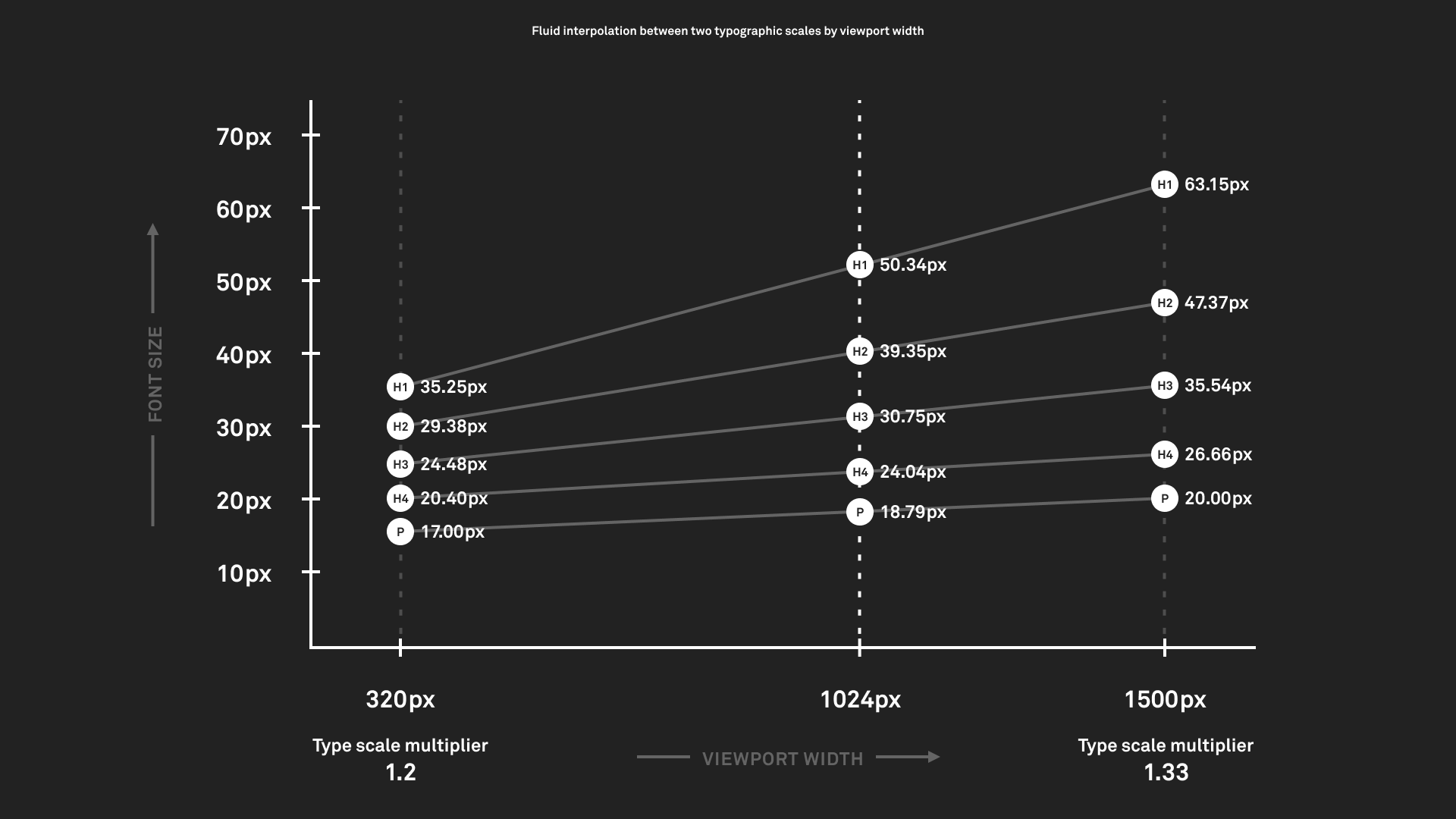
astro-erudite personally uses the following:
- The minimum viewport is 328px,1 where the font size should be 16px and the type scale should be 1.125 (major second).
- The maximum viewport is 1215px, where the font size should be 18px and the type scale should be 1.2 (minor third).2
| Scale step | @min |
@max |
|---|---|---|
| 3 | 22.78 | 31.10 |
| 2 | 20.25 | 25.92 |
| 1 | 18.00 | 21.60 |
| 0 | 16.00 | 18.00 |
| -1 | 14.22 | 15.00 |
You can find the calculator preset for this particular setup here. It will then generate the following:
:root { /* https://utopia.fyi/type/calculator?c=328,16,1.125,1215,18,1.2,3,1,&s=0.75|0.5|0.25,1.5|2|3|4|6,s-l|s-m&g=s,m,2xl,12 */ --step--1: clamp(0.8889rem, 0.8709rem + 0.0877vw, 0.9375rem); --step-0: clamp(1rem, 0.9538rem + 0.2255vw, 1.125rem); --step-1: clamp(1.125rem, 1.0418rem + 0.4059vw, 1.35rem); --step-2: clamp(1.2656rem, 1.1346rem + 0.6392vw, 1.62rem); --step-3: clamp(1.4238rem, 1.2315rem + 0.9383vw, 1.944rem);11 collapsed lines
--font-weight-normal: 400; --font-weight-medium: 450;
--tracking-tight: -0.015em; --leading-offset: 0.65rem;
--prose-foreground: color-mix(in oklab, var(--foreground) 80%, transparent); --prose-marker: color-mix(in oklab, var(--foreground) 30%, transparent);
--measure: 40rem;}You then can simply assign these in your typography!
Tip
There are no rules to how you are supposed to map each step, but I’ve opted for the following:
--step--1→ chrome (visual navigation) elements, subtext,<h5>/<h6>(to disincentivize using them)--step-0→<p>,<h4>--step-1→<h3>--step-2→<h2>--step-3→<h1>
In general, though, you should use --step-0 as your baseline since it is the step that you actually control.
In addition to handling type scaling, the aforementioned poles are also used for spacing! Utopia calls these “t-shirt sizes,” which is quite cute actually.
There are three types of scaling variables that Utopia outputs for you:
- Single-space. These are the self-explanatory base-level space variables.
- Space-value pairs (single-step). If you wish for any particular space to have a more emphasized scaling effect when interpolated, you can use a space-value pair! For example,
--space-m-lwill interpolate between M → L from the minimum to maximum poles. - Space-value pairs (arbitrary). You can arbitrarily assign any single-space variable at any pole and have it scale! I personally don’t use this feature, but you can output it.
:root { /* https://utopia.fyi/grid/calculator?c=320,16,1.125,1024,18,1.2,6,1,&s=0.75%7C0.5%7C0.25,1.5%7C2%7C3%7C4%7C6,s-l%7Cs-m&g=s,m,2xl,12 */ --space-3xs: clamp(0.25rem, 0.2269rem + 0.1127vw, 0.3125rem); --space-2xs: clamp(0.5rem, 0.4769rem + 0.1127vw, 0.5625rem); --space-xs: clamp(0.75rem, 0.7038rem + 0.2255vw, 0.875rem); --space-s: clamp(1rem, 0.9538rem + 0.2255vw, 1.125rem); --space-m: clamp(1.5rem, 1.4307rem + 0.3382vw, 1.6875rem); --space-l: clamp(2rem, 1.9076rem + 0.451vw, 2.25rem); --space-xl: clamp(3rem, 2.8613rem + 0.6764vw, 3.375rem); --space-2xl: clamp(4rem, 3.8151rem + 0.9019vw, 4.5rem); --space-3xl: clamp(6rem, 5.7227rem + 1.3529vw, 6.75rem);
--space-3xs-2xs: clamp(0.25rem, 0.1344rem + 0.5637vw, 0.5625rem); --space-2xs-xs: clamp(0.5rem, 0.3613rem + 0.6764vw, 0.875rem); --space-xs-s: clamp(0.75rem, 0.6113rem + 0.6764vw, 1.125rem); --space-s-m: clamp(1rem, 0.7458rem + 1.2401vw, 1.6875rem); --space-m-l: clamp(1.5rem, 1.2227rem + 1.3529vw, 2.25rem); --space-l-xl: clamp(2rem, 1.4915rem + 2.4803vw, 3.375rem); --space-xl-2xl: clamp(3rem, 2.4453rem + 2.7057vw, 4.5rem); --space-2xl-3xl: clamp(4rem, 2.9831rem + 4.9605vw, 6.75rem);
--grid-max-width: 75.94rem; --grid-gutter: var(--space-s-m); --grid-columns: 12;
--page-offset-top: var(--space-xl); --page-offset-bottom: var(--space-m);}These can be used throughout your site’s margin and padding values to create this neat scaling effect. In particular, it is used in Utopia’s fluid grid system, which establishes a set of 123 columns and gutters that scale between your minimum and maximum poles using single-space variables. v2 uses the following configuration:
| Width | @min | @max |
|---|---|---|
| Container | 328px | 1215px |
| Gutter | 16px | 27px |
| Column | 10px | 72px |
We can then establish our grid layout and span sections across it:
<html lang={SITE.locale} dir={SITE.dir}> <MetaHead> <slot name="head" /> </MetaHead> <body> <page-grid> <page-header> <page-nav> <Sidebar crumbs={crumbs}><slot name="actions" slot="actions" /></Sidebar> </page-nav>5 collapsed lines
{ Astro.slots.has("toc") && ( <page-toc><slot name="toc" /></page-toc> ) } </page-header> <page-content> <main><slot /></main> <page-footer><Footer /></page-footer> </page-content> </page-grid> </body></html>
<style> page-grid { position: relative; isolation: isolate; display: grid; grid-template-columns: repeat(var(--grid-columns), minmax(0, 1fr)); gap: calc(var(--grid-gutter)); max-width: var(--grid-max-width); min-height: 100svh; margin-inline: auto; padding-inline: var(--grid-gutter); padding-block-start: var(--page-offset-top); }
page-header { display: contents; } page-nav { grid-column: 1 / 3; grid-row: 1; } page-content { grid-column: 3 / 10; grid-row: 1; } page-toc { grid-column: 10 / 13; grid-row: 1; } /* ... */</style>And that is a complete rundown of astro-erudite’s new design system!
“If not Tailwind’s color system, then what?”
Radix Colors, with each scale carrying a light and dark value per step:
:root { --gray-1: light-dark(#fcfcfc, #111111); --gray-2: light-dark(#f9f9f9, #191919); --gray-3: light-dark(#f0f0f0, #222222); --gray-4: light-dark(#e8e8e8, #2a2a2a); --gray-5: light-dark(#e0e0e0, #313131); --gray-6: light-dark(#d9d9d9, #3a3a3a); --gray-7: light-dark(#cecece, #484848); --gray-8: light-dark(#bbbbbb, #606060); --gray-9: light-dark(#8d8d8d, #6e6e6e); --gray-10: light-dark(#838383, #7b7b7b); --gray-11: light-dark(#646464, #b4b4b4); --gray-12: light-dark(#202020, #eeeeee);
--red-9: light-dark(#e5484d, #e5484d); --red-11: light-dark(#ce2c31, #ff9592);
--background: var(--gray-1); --foreground: var(--gray-12); --primary: var(--gray-12); --primary-foreground: var(--gray-1); --muted: var(--gray-3); --muted-foreground: var(--gray-11); --destructive: var(--red-11); --border: var(--gray-6); --ring: var(--gray-8);
color-scheme: light dark;}We now use light-dark() here instead of Tailwind’s dark:* variant. We do still need to use a little bit of JavaScript to handle saving the user’s color scheme if they hit the toggle button. However, upon first load astro-erudite will always respect system preference.
“If not Tailwind’s […], then what?”
This is a bunch of miscellaneous Tailwind stuff we have actually kept in some capacity:
- For its CSS reset
(a CSS reset serves to minimize cross-browser inconsistencies) , we do still actually use Preflight, but it’s simply vendored in asreset.css. - For its various utilities with nice numbers, I’ve hand-selected some in
shape.cssfor use cases like when we need border radius or backdrop blurs.
Regarding typography
As you might have noticed, astro-erudite is now using a new font! We’re now on IBM Plex Sans and IBM Plex Mono. Historically, IBM Plex Sans was commissioned by IBM to replace Helvetica Neue
Some other readability changes:
-
I personally despise heavy font weights. I also despise thin weights. Since astro-erudite is, of course, opinionated, I’ve decided to exclusively ship only the 400
(normal) and 500(medium) weights of IBM Plex Mono. For IBM Plex Sans, a variable font, I’ve made it so that there are no instances of weights other than 400 and 450(not 500!) throughout v2. I almost always prefer establishing hierarchy through opacity rather than weight: headers and links should get 100%, prose should get 80%, and muted text should get 60%. -
Due to Utopia, desktop devices now get big 18px fonts, and mobile devices get 16px fonts. v1 had 16px on desktop, and it just stayed like that.
-
In regards to line height, all lines now use the following computation:
--leading-offset: 0.65rem;line-height: calc(var(--leading-offset) + 1em);Instead of some unitless multiplier number, we now additively add a constant offset (0.65rem) to each element’s own font size (1em). This keeps a roughly constant gap between lines regardless of text size, so headings stay tight and body text stays comfortable without needing a separate line-height rule for every heading and paragraph.
-
We now use
max-inline-size: var(--measure)where--measure: 40rem. 40rem makes the overall content width narrower and nicer to read. -
For the specific task of importing fonts via
@font-face, you may notice that there’s a couple of weird entries:src/styles/fonts.css @font-face {font-family: "IBM Plex Sans";src: url("../assets/fonts/IBMPlexSans-LatinExt-VariableFont_wght.woff2") format("woff2");font-weight: 100 700;font-style: normal;font-display: swap;unicode-range: U+0100-02FF, U+0300-036F, U+1D00-1DBF, U+1E00-1EFF, U+20A0-20C0, U+2C60-2C7F, U+A720-A7FF;}9 collapsed lines@font-face {font-family: "IBM Plex Sans";src: url("../assets/fonts/IBMPlexSans-LatinExt-Italic-VariableFont_wght.woff2") format("woff2");font-weight: 100 700;font-style: italic;font-display: swap;unicode-range: U+0100-02FF, U+0300-036F, U+1D00-1DBF, U+1E00-1EFF, U+20A0-20C0, U+2C60-2C7F, U+A720-A7FF;}@font-face {font-family: "IBM Plex Sans Fallback";src: local("Arial");font-weight: 100 700;font-style: normal;size-adjust: 101.1663%;ascent-override: 101.3184%;descent-override: 27.183%;line-gap-override: 0%;}11 collapsed lines@font-face {font-family: "IBM Plex Sans Fallback";src: local("Arial");font-weight: 100 700;font-style: italic;size-adjust: 101.1663%;ascent-override: 101.3184%;descent-override: 27.183%;line-gap-override: 0%;}- The former entries involve a
LatinExt(Latin Extended) font. The goal is to support the rendering of Latin-based characters in other languages, e.g. Spanish, French, Vietnamese, German, Polish, etc. It also allows me to properly render the IPA pronunciation of erudite(/ˈer(y)əˌdīt/) so that I can put a cool dictionary definition on the homepage of this template. - The latter entries involve a fallback font. I manually specify
local("Arial")as the fallback, but then I also specify these weird adjustments to ascenders, descenders, and sizing. These were actually automatically generated by Astro’s Fonts API(which I intentionally didn’t use because its syntax was clunky for minimal benefit) .
- The former entries involve a
The typography files themselves have also dramatically changed. Instead of throwing everything into global.css and typography.css !important 9 (!!!) times)<kbd>, inline code)
Regarding MDX
v2 no longer ships with the @astrojs/mdx package/mdx() plugin by default. This is one of my more debatable decisions, so I should explain myself a little bit.
The entire point of MDX is to provide an easy way to write interactive components inside of your prose. Here is one now:
There’s actually no MDX involved here! You’re reading a regular .md file. That button is an autonomous custom element defined a few lines up in this exact document, which works because raw HTML <script> tags)
<click-counter></click-counter>
<script>  if (!customElements.get("click-counter")) {    customElements.define(      "click-counter",      class extends HTMLElement {        connectedCallback() {          let count = 0          const button = document.createElement("button")          button.textContent = "Clicked 0 times"          button.addEventListener("click", () => {            button.textContent = `Clicked ${++count} times`          })          this.append(button)        }      },    )  }</script>
Note
The customElements.get() check is not optional! Since astro-erudite has View Transitions, it re-runs body scripts across page swaps, and customElements.define() throws if the name is already registered.
A plethora of other benefits also comes with unchaining ourselves from the React ecosystem like this:
- Removing
@astrojs/mdxalso drops our dependency tree by 51 packages(more packages than everything v2 stacks on top of Astro!) . - JSX syntax is a lot less forgiving for both humans and compilers. Non-technical writers find it harder to write valid JSX, and embedded JSX can also fail entire builds. In general, rendering it is heavier.
- Your blogs are now dramatically more portable and universal to different platforms!
I also want to reiterate that you are completely free to install it yourself if you need it. If your blog leans heavily into interactive playgrounds, MDX with a framework island is still the right tool. I just no longer am convinced its weight is worth it to be a default for a personal blog.
“But what about callouts?”
I don’t know why I ever thought this was in any way ergonomic, but in v1 any time you wanted to add a callout you would have to import it at the top of your file and call it like this:
import Callout from '@/components/callout.astro'
<Callout title="Testing" variant="note">  Hello, world!</Callout>
v2 ships with the Sätteri Markdown processor, which supports directives with the same specification as remark-directive. We now can add callouts to our Markdown content like this, without any imports:
:::note[Testing]Hello, world!:::This renders as:
Note (Testing)
Hello, world!
We do this with a custom MDAST plugin that hooks into Sätteri, rather than an Astro component. Do note that this is one of the breaking changes from v1 to v2.
Regarding unified and Sätteri
With the release of Astro 6.4, a new markdown.processor API was added that allows you to swap out the entire unified pipeline. An official alternative was added, Sätteri, a Markdown/MDX processor written in Rust. Of course, it’s very fast
For reference, this was v1’s Markdown setup. It was a set of seven different plugins stacked ridiculously like Tetris pieces into this single object styleOverrides block)
markdown: { syntaxHighlight: false, rehypePlugins: [ [ rehypeExternalLinks, { target: '_blank', rel: ['nofollow', 'noreferrer', 'noopener'], }, ], rehypeHeadingIds, rehypeKatex, [ rehypeExpressiveCode, { themes: ['github-light', 'github-dark'], plugins: [pluginCollapsibleSections(), pluginLineNumbers()], useDarkModeMediaQuery: false, themeCssSelector: (theme: ExpressiveCodeTheme) => `[data-theme="${theme.name.split('-')[1]}"]`, defaultProps: { wrap: true, collapseStyle: 'collapsible-auto', overridesByLang: { 'ansi,bat,bash,batch,cmd,console,powershell,ps,ps1,psd1,psm1,sh,shell,shellscript,shellsession,text,zsh': { showLineNumbers: false, }, }, }, styleOverrides: {25 collapsed lines
codeFontSize: '0.75rem', borderColor: 'var(--border)', codeFontFamily: 'var(--font-mono)', codeBackground: 'color-mix(in oklab, var(--muted) 25%, transparent)', frames: { editorActiveTabForeground: 'var(--muted-foreground)', editorActiveTabBackground: 'color-mix(in oklab, var(--muted) 25%, transparent)', editorActiveTabIndicatorBottomColor: 'transparent', editorActiveTabIndicatorTopColor: 'transparent', editorTabBorderRadius: '0', editorTabBarBackground: 'transparent', editorTabBarBorderBottomColor: 'transparent', frameBoxShadowCssValue: 'none', terminalBackground: 'color-mix(in oklab, var(--muted) 25%, transparent)', terminalTitlebarBackground: 'transparent', terminalTitlebarBorderBottomColor: 'transparent', terminalTitlebarForeground: 'var(--muted-foreground)', }, lineNumbers: { foreground: 'var(--muted-foreground)', }, uiFontFamily: 'var(--font-sans)', }, }, ], [ rehypeShiki, { themes: { light: 'github-light', dark: 'github-dark', }, inline: 'tailing-curly-colon', }, ], ], remarkPlugins: [remarkMath, remarkEmoji], },The order of operations within this setup also mattered rehype-expressive-code for code blocks, and rehype-shiki for inline code. This was the workaround for the longest time, because Expressive Code only supported highlighting code blocks.
v2’s Markdown configuration now looks like this:
markdown: { syntaxHighlight: false, processor: satteri({ features: { directive: true, math: true }, mdastPlugins: [calloutDirective, inlineExpressiveCode, temmlMath], hastPlugins: [externalLinks, blockExpressiveCode, headingNamespace], }), },Every single plugin in mdastPlugins and hastPlugins is a file in src/lib that I wrote myself. Sätteri doesn’t run remark or rehype plugins at all, but rather has its own plugin API where a plugin is just an object with a name and a visitor per node type, operating on either the MDAST
From here, I will talk about each of the six plugins that I’ve created and shipped with v2. Since Sätteri is still incredibly young
Rendering external links
We sort this section from trivial to nontrivial. The most basic of these is my external-links plugin, and its sole purpose is to add target="_blank" and rel="nofollow noreferrer noopener" to links. We do this via the HAST:
import { defineHastPlugin } from "satteri"
export const externalLinks = defineHastPlugin({ name: "external-links", element: { filter: ["a"], visit(node, ctx) { const href = node.properties.href if (typeof href === "string" && /^https?:\/\//.test(href)) { ctx.setProperty(node, "target", "_blank") ctx.setProperty(node, "rel", "nofollow noreferrer noopener") } }, },})Namespacing headings
This plugin is responsible for namespacing headings within posts that have subposts (which I talk about in Regarding subposts, since this system has also been completely overhauled). This is so that in the case where multiple subposts share the same heading, the headings are differentiated by prepending the post’s file name to the ID. We do this via the HAST:
import GithubSlugger from "github-slugger"import { defineHastPlugin } from "satteri"
const SUBPOST = /\/blog\/[^/]+\/(?!index\.mdx?$)([^/]+)\.mdx?$/
export function headingNamespace() { const slugger = new GithubSlugger() return defineHastPlugin({ name: "heading-namespace", element: { filter: ["h1", "h2", "h3", "h4", "h5", "h6"], visit(node, ctx) { const match = SUBPOST.exec(ctx.filename) if (!match) return ctx.setProperty( node, "id", `${match[1]}-${slugger.slug(ctx.textContent(node))}`, ) }, }, })}Two details make this plugin work:
- It’s exported as a factory function rather than a plain plugin object. Sätteri accepts both, but a factory is re-invoked for every document, which gives each post a fresh slugger
( .github-sluggerdeduplicates within an instance, so a shared one would leakintroduction-1,introduction-2, … across posts) - Heading IDs aren’t actually generated by Sätteri itself. They come from
@astrojs/markdown-satteri, which appends its own slugging plugin at the very end of the HAST plugin chain. Crucially, that built-in plugin respects anyidthat already exists and passes it unchanged, meaning that I can claim the ID first.
Rendering math
v1 rendered LaTeX through remark-math and rehype-katex. KaTeX outputs a mountain of nested <span> elements that are completely meaningless without its stylesheet, so v1 also shipped a script that watched every page swap and injected katex.min.css .katex element. This was a ridiculous approach and I’m sorry for this.
v2 renders LaTeX through Temml, which outputs MathML. Since MathML is actually browser-native
import { defineMdastPlugin } from "satteri"import temml from "temml"
const err = (e: unknown) => (e instanceof Error ? e.message : String(e))
export function temmlMath() { return defineMdastPlugin({ name: "temml-math", inlineMath(node, ctx) { try { const value = temml.renderToString(node.value, { throwOnError: false }) return { type: "html", value } } catch (error) { ctx.report({ message: `temml-math: failed on \`${node.value}\`: ${err(error)}`, node, severity: "warning", }) } }, math(node, ctx) { try { const value = temml.renderToString(node.value, { displayMode: true, throwOnError: false, }) return { type: "html", value: `<math-display>${value}</math-display>` } } catch (error) { ctx.report({ message: `temml-math: failed on \`${node.value}\`: ${err(error)}`, node, severity: "warning", }) } }, })}Math syntax ($...$ and $$...$$) is its own Sätteri feature flag, which is why math: true sits next to directive: true in the config. The plugin hands the TeX to Temml and returns the raw MathML back into the tree, and block-level math additionally gets wrapped in a <math-display> custom element so the stylesheet has something to center and horizontally scroll:
Rendering callouts
This is the plugin I promised back in “But what about callouts?”. With the flag on, Sätteri parses ::: blocks into containerDirective : and leaf ::)
37 collapsed lines
import { readFileSync } from "node:fs"import { dirname, join } from "node:path"import { fileURLToPath } from "node:url"import type { ElementContent } from "hast"import { toHtml } from "hast-util-to-html"import { h } from "hastscript"import { defineMdastPlugin } from "satteri"
const ICONS_DIR = join( dirname(fileURLToPath(import.meta.url)), "../assets/icons/callouts",)
const loadIcon = (name: string) => readFileSync(join(ICONS_DIR, `${name}.svg`), "utf8") .replace("<svg", '<svg aria-hidden="true"') .replace(/\s+/g, " ") .trim()
const VARIANTS: Record<string, string> = { note: "info-circle", tip: "lightbulb", warning: "danger-triangle", caution: "shield-warning", important: "bell",}
const icons: Record<string, string> = {}for (const name of [...new Set(Object.values(VARIANTS)), "alt-arrow-down"]) { icons[name] = loadIcon(name)}
const capitalize = (s: string) => s.charAt(0).toUpperCase() + s.slice(1)
const raw = (value: string): ElementContent => ({ type: "raw", value }) as unknown as ElementContent
export function calloutDirective() { return defineMdastPlugin({ name: "callout-directive", containerDirective(node, ctx) { const iconName = VARIANTS[node.name] if (!iconName) return
const first = node.children[0] const isLabel = first?.type === "paragraph" && (first.data as { directiveLabel?: boolean })?.directiveLabel === true const label = isLabel ? ctx.textContent(first) : null if (isLabel) ctx.removeNode(first)
const title: ElementContent[] = [ { type: "text", value: capitalize(node.name) }, ] if (label) title.push(h("span", ` (${label})`))
const summary = toHtml( h("summary", [ raw(icons[iconName]), h("span", title), raw(icons["alt-arrow-down"]), ]), { allowDangerousHtml: true }, )
const closed = !!node.attributes && "closed" in node.attributes
ctx.prependChild(node, { type: "html", value: summary }) ctx.setProperty(node, "data", { hName: "details", hProperties: { dataCallout: node.name, open: !closed, }, }) }, })}The five variants defined in the plugin are derived from GitHub alerts <details> elements, every callout you’ve seen in this post is natively collapsible with exactly zero JavaScript, and appending {closed} to the directive makes one start out collapsed.
There are some clever things behind-the-scenes that make this all work very elegantly:
- The icons are Solar SVGs read off the disk at build time and inlined straight into the HTML, so we need no client-side fetching of icons and no icon library.
- Each
data-calloutvariant only needs a single color defined for--accent, and then legible colors are automatically derived for both light and dark mode with some small modifications to lightness and chroma:
prose-content { [data-callout] { --accent: var(--muted-foreground); --callout-border: var(--accent); --callout-text: light-dark( oklch(from var(--accent) 0.48 calc(c * 1.05) h), oklch(from var(--accent) 0.83 calc(c * 0.5) h) );55 collapsed lines
position: relative; padding-block: 0.75rem; padding-inline: 1rem 0; border-inline-start: 4px solid var(--callout-border);
> summary { display: flex; align-items: center; cursor: pointer; list-style: none; font-weight: 500; color: var(--callout-text);
&::-webkit-details-marker { display: none; }
svg { flex-shrink: 0; inline-size: 1.25rem; block-size: 1.25rem; }
svg:first-child { margin-inline-end: 0.5rem; }
svg:last-child { margin-inline-start: auto; }
> span { margin-inline-end: 0.5rem;
> span { font-weight: 400; opacity: 0.7; } } }
&[open] > summary { margin-block-end: 0.75rem;
svg:last-child { transform: rotate(180deg); } }
> :last-child { margin-block-end: 0; } }
[data-callout="note"] { --accent: #0090ff; } [data-callout="tip"] { --accent: #30a46c; } [data-callout="warning"] { --accent: #ffc53d; } [data-callout="caution"] { --accent: #e5484d; } [data-callout="important"] { --accent: #8e4ec6; }}Highlighting code blocks
Code blocks are still rendered by Expressive Code, because nothing else comes close satteri-expressive-code
import expressiveCode from "satteri-expressive-code"import { ecRenderer } from "./config"import { inlineExpressiveCode } from "./inline"
export const blockExpressiveCode = expressiveCode({ customCreateRenderer: () => ecRenderer,})
export { inlineExpressiveCode }The configuration styleOverrides block I told you not to worry about)astro.config.ts, and every override points at a custom property from the design system, so code blocks scale fluidly with Utopia and follow the theme toggle like everything else on the page:
import { pluginCollapsibleSections } from "@expressive-code/plugin-collapsible-sections"import { pluginLineNumbers } from "@expressive-code/plugin-line-numbers"import { createRenderer, type SatteriExpressiveCodeOptions,} from "satteri-expressive-code"
export const ecOptions: SatteriExpressiveCodeOptions = { themes: ["github-light", "github-dark"], useDarkModeMediaQuery: true, themeCssSelector: (theme) => `[data-theme="${theme.name === "github-dark" ? "dark" : "light"}"]`, plugins: [pluginCollapsibleSections(), pluginLineNumbers()],45 collapsed lines
defaultProps: { wrap: true, showLineNumbers: true, collapseStyle: "collapsible-auto", overridesByLang: { "ansi,bat,bash,batch,cmd,console,powershell,ps,ps1,psd1,psm1,sh,shell,shellscript,shellsession,text,zsh": { showLineNumbers: false, }, }, }, styleOverrides: { codeFontSize: "var(--step--1)", codeFontFamily: "var(--font-mono)", codeBackground: "color-mix(in oklab, var(--muted) 25%, transparent)", borderColor: "var(--border)", borderRadius: "0", uiFontFamily: "var(--font-sans)", lineNumbers: { foreground: "var(--muted-foreground)", }, frames: { editorActiveTabForeground: "var(--muted-foreground)", editorActiveTabBackground: "transparent", editorActiveTabIndicatorBottomColor: "transparent", editorActiveTabIndicatorTopColor: "transparent", editorTabBorderRadius: "0", editorTabBarBackground: "transparent", editorTabBarBorderBottomColor: "transparent", frameBoxShadowCssValue: "none", terminalBackground: "color-mix(in oklab, var(--muted) 25%, transparent)", terminalTitlebarBackground: "transparent", terminalTitlebarBorderBottomColor: "transparent", terminalTitlebarForeground: "var(--muted-foreground)", }, textMarkers: { backgroundOpacity: "25%", borderOpacity: "25%", defaultChroma: "50", lineMarkerLabelColor: "var(--foreground)", }, collapsibleSections: { closedFontFamily: "var(--font-sans)", }, },}
export const ecRenderer = createRenderer(ecOptions)The line that actually matters here is customCreateRenderer. If we had left it alone, the plugin would create its own private Expressive Code renderer. Instead, we create the renderer ourselves and hand it over, because we’ll need to borrow it in the next section.
Highlighting inline code
This plugin is the most complicated of the six, and my personal favorite. As mentioned before, v1 ran two separate highlighters because Expressive Code only handles fenced code blocks rehype-expressive-code for blocks, and @shikijs/rehype for inline code)
v2 keeps @shikijs/rehype’s annotation syntax, an inline snippet ending in {:lang}
The `mdx(){:ts}` plugin is gone.The major difference is that it now feeds through the exact same renderer as the code blocks. When the plugin sees an annotated inline code node, it constructs a one-line ExpressiveCodeBlock, renders it with the shared renderer from config.ts, plucks the highlighted tokens out of the result, and throws the rest of the frame away:
13 collapsed lines
import type { ElementContent } from "hast"import { toHtml } from "hast-util-to-html"import { select } from "hast-util-select"import { h } from "hastscript"import type { Html } from "mdast"import { defineMdastPlugin } from "satteri"import { type ExpressiveCode, ExpressiveCodeBlock, type ExpressiveCodeTheme,} from "satteri-expressive-code"import { ecRenderer } from "./config"
const ANNOTATION = /^(.+?)\{:([^}]+)\}$/
type Annotation = | { kind: "lang"; code: string; lang: string } | { kind: "scope"; code: string; scope: string }
function parseAnnotation(value: string): Annotation | null { const match = ANNOTATION.exec(value) if (!match) return null const [, code, tag] = match if (!code || tag === ".") return null return tag.startsWith(".") ? { kind: "scope", code, scope: tag.slice(1) } : { kind: "lang", code, lang: tag }}
async function highlightLanguage( ec: ExpressiveCode, code: string, lang: string,): Promise<ElementContent[]> { const block = new ExpressiveCodeBlock({ code, language: lang }) const { renderedGroupAst } = await ec.render(block) const tokens = select(".ec-line .code", renderedGroupAst)?.children return tokens ?? [{ type: "text", value: code }]}
20 collapsed lines
function highlightScope( ec: ExpressiveCode, code: string, scope: string,): ElementContent[] { const [light, dark] = ec.styleVariants const c0 = resolveScopeColor(light.theme, scope) const c1 = resolveScopeColor(dark.theme, scope) return [h("span", { style: `--0:${c0};--1:${c1}` }, code)]}
function resolveScopeColor(theme: ExpressiveCodeTheme, scope: string): string { const best = (theme.settings ?? []) .flatMap((rule) => (rule.scope ?? []).map((s) => ({ s, fg: rule.settings.foreground })), ) .filter(({ s, fg }) => fg && (scope === s || scope.startsWith(`${s}.`))) .sort((a, b) => b.s.length - a.s.length)[0] return best?.fg ?? theme.fg}
export function inlineExpressiveCode() { return defineMdastPlugin({ name: "inline-expressive-code", async inlineCode(node, ctx) { const annotation = parseAnnotation(node.value) if (!annotation) return
try { const { ec } = await ecRenderer const tokens = annotation.kind === "lang" ? await highlightLanguage(ec, annotation.code, annotation.lang) : highlightScope(ec, annotation.code, annotation.scope) const dataLanguage = annotation.kind === "lang" ? annotation.lang : undefined
const value = toHtml(h("code", { dataEc: "", dataLanguage }, tokens)) return { type: "html", value } satisfies Html } catch (error) { const reason = error instanceof Error ? error.message : String(error) ctx.report({ message: `inline-expressive-code: failed on \`${node.value}\`: ${reason}`, node, severity: "warning", }) } }, })}Now that we have a single highlighter, we only need a single configuration for both code blocks and inline code, and they will never drift out of sync with each other again. There’s even the added bonus that you can use TextMate scopes, so I can paint anything with whatever color the active theme assigns to strings!
And that is the entire v2 Markdown pipeline!
Regarding subposts
Subposts were one of the most important features of v1. They allowed you to compartmentalize content into smaller and more digestible pieces, and allowed you to establish a chain of related content. Although I am speaking of it in past tense like I mysteriously decided to remove it in v2, it’s not going anywhere! I just made it infinitely better to use.
Within v1, a subpost was its own standalone page. You’d read the parent, then click into part one, then click into part two, and so on. Since every part was a separate URL with separate content, I had to build three different navigational components so that you never felt lost:
- A sticky sidebar listing the series on desktop (
SubpostsSidebar.astro) - A collapsible dropdown on mobile (
SubpostsHeader.astro) - A special three-column previous/parent/next footer
In addition to a lot of modified post metadata data-utils.ts existed just to serve them.
We approach this concept in v2 very differently. Rather than splitting into separate pages for each subpost, we now have a single continuous document. Every URL in the series renders the parent and every subpost, top to bottom. The only difference between the URLs is where you land. Now, you navigate through subposts simply by scrolling, and your scrollbar is the navigational tool.
If you wish to see a live demo, the v1 posts on this website have been archived as a series, which means the v1.6.0 post that originally announced subposts is now itself a subpost. Open it and watch the address bar as you scroll.
I’ve avoided changing the authoring experience index.md and its sibling subposts, plus an optional order field in the frontmatter)
export async function getStaticPaths() { const posts = await getPosts() const series = await getSubposts() return posts.flatMap((parent, i) => { const chain = [parent, ...(series.get(parent.id) ?? [])] return chain.map((post) => ({ params: { id: post.id }, props: { post, chain, prev: posts[i + 1], next: posts[i - 1] }, })) })}From there, a small script updates your address bar. An IntersectionObserver watches a thin band near the top of the viewport, and whenever a different article in the chain crosses it, the URL and tab title silently swap to match what you’re reading. Of course, this is bidirectional:
const { url, title } = current.datasetif (url && trimSlash(location.pathname) !== url) { history.replaceState(history.state, "", url + hash) if (title) document.title = title syncCrumb(current)}Incidentally, several benefits come from switching to this design:
- Each subpost URL is unique, so deep links work exactly as expected. You will be scrolled to that article in the series before first paint.
- Since every URL in a series shares the same body, the scroll position Astro stores in
history.stateis valid on all of them, so reloading or hitting the back button restores the exact spot where you were reading! - Subpost URLs now declare a
<link rel="canonical">pointing at the parent, so search engines don’t index the same document multiple times. - Only the article you landed on gets an eagerly-loaded banner image; every other banner in the chain lazy-loads.
- We can entirely rid ourselves of
SubpostsSidebar.astroandSubpostsHeader.astroby simply combining them withTableOfContents.astro. The table of contents now outlines the entire series, with a collapsible group per subpost. The collapsible group will open when you enter a new subpost, but will not close behind you when you leave the post you were coming from.
Important
The trade-off with this approach is that every URL of a series ships the HTML of the entire series. I’m fine with this, as HTML compresses extremely well, and images
Regarding UI/UX
The rest of the changes are smaller interface decisions that don’t individually deserve a full section, so here they are rapid-fire:
- The header is now a sidebar. I’ve come to dislike headers in the past couple of months, as I felt they were obstructing the vertical flow of content. On desktop, v1 had both this header and a breadcrumb on every page. On mobile, you could have up to three headers if you were on a post with subposts. v2 merges the navigation and breadcrumb into what is effectively a tiny file tree! I feel that this is an intuitive approach to navigating websites, especially with the indentation. Below 64rem
(when there’s no longer room for it) the sidebar flattens back into a top bar.- There is exactly one table of contents. v1 shipped both a
toc-sidebar.astrofor desktop andtoc-header.astrofor mobile. v2 renders both out of a singleTableOfContents.astrothanks to our new Utopian grid! It comes with the same nice features as before(multi-section highlighting, automatic scrolling on long pages) , but additionally adds collapsible subpost dropdowns for when posts have them.
- There is exactly one table of contents. v1 shipped both a
- Pagination is dead. v1 chopped the blog index into pages of three posts and walked you between them with a shadcn/ui
<Pagination>component. Nobody has ever wanted to be on page 4 of a personal blog. v2 puts every post on one page and lets you scroll because pagination never made sense in the first place for that scale. - The about page is also dead. You should probably use your homepage as an about me section rather than tucking it away. Projects, which were previously squatting at the bottom of the about page, have been promoted to their own /projects route!
- We can now mix-and-match icons! v1 originally used Lucide through its three separate icon packages. In a similar vein to Geist’s removal, Lucide has been ridiculously overused in the last couple of years, and readers deserve something a little bit more fresh. Since we no longer depend on icon libraries, we no longer have any particular loyalty to a specific icon set and can now mix and match! I mainly used Solar’s Bold variant, but for the navigation arrows I used Phosphor and for the theme toggle I used Akar Icons.
- Better post navigation and quality-of-life. Rather than having two copies of previous/next buttons at the top and bottom of the page
(which is what v1 did) , the sidebar layout now allows for a persistent set of action buttons on the bottom left: the theme toggle, prev/next buttons, and a “scroll to top” button that only appears when the user scrolls enough down the page.
Breaking changes
v2 is a really big rewrite. Design-wise, if you have a customized v1 fork, I would highly suggest not attempting to pull v2 into it. My suggestion here would actually be to send the diff between your v1 fork and v1 baseline to an agent and then have it replicate those changes on a fresh v2.
Content-wise, ensure you (or your agent) are aware of the following caveats when porting a v1 post to v2:
.mdxfiles are no longer collected. The content loader’s glob is**/[^_]*.mdnow(the .[^_]also lets you hide a file from the loader entirely by prefixing it with an underscore)- Ensure you convert all instances of
<Callout>to:::directives, and interactive components to custom elements with a<script>tag. - If your content is too interactive and needs framework islands, install
@astrojs/mdxback and re-add.mdxto your glob.
- Ensure you convert all instances of
authorsis now required, and it’s a real reference. v1’s frontmatter field was an optional array of strings that simply hoped a matching author file existed. v2 usesreference("authors"), so every post must declare its authors and the build fails loudly when one points at nothing. This removes the concept of “guest” authors, or authors that never resolve.- Author socials are now collapsed into one field.
website,twitter,github,linkedin, anddiscordare no longer five hardcoded schema fields, but a singlesocialsrecord mapping any label to a URL. You are no longer limited to the five networks I happened to think of in 2024. - Emoji shortcodes are gone.
remark-emojileft with the rest of the unified pipeline, so:wink:renders as its literal syntax. Your operating system has an emoji picker. 😉 - Math renders to MathML. The
$...$and$$...$$syntax is unchanged, but KaTeX-specific macros and extensions won’t necessarily exist in Temml’s support table. In practice the overlap covers everything a blog post actually uses, so this shouldn’t be a problem. - Heading anchors inside subposts moved. A series is one continuous document now, so subpost headings get namespaced IDs to avoid collisions
( . Old deep links to subpost headings will land on the right page but not scroll to the right spot.#introductioninsidedeploy.mdbecomes#deploy-introduction) - Some URLs no longer exist.
/aboutis gone(projects moved to , and the paginated/projects)/blog/2,/blog/3, … pages are now also gone. If you care about inbound links to these, Astro’sredirectsconfig has you covered. consts.tswas reshaped a little bit.NAV_LINKSis nowNAVIGATION,SOCIAL_LINKSis nowSOCIALSand imports its SVG icons directly, andICON_MAPis gone because there is no icon library left to map into!SITElostpostsPerPageandhref, and gaineddirplusdefaultPageImageanddefaultPostImage.- Your Tailwind customizations have nowhere to go. This unfortunately is the painful one. Any classes you’ve layered onto v1 components have to be rewritten as actual CSS against the new design system. I genuinely believe the result will be smaller and more legible than what you had, but there is work to be done. Please defer to your local coding agent for guidance!
- Your remark and rehype plugins won’t run. Any remark or rehype plugins you depend on will need to be ported to Sätteri’s plugin API. Thankfully, you have six plugins in
src/libthat you can use as reference implementations.
Conclusion
I am very aware of the irony of doing all of this knowing full well that in another two years my taste will have shifted yet again and I’ll be drafting v3. I think this is totally fine! I’ve always wanted astro-erudite to be a realistic snapshot of my current preferences and judgement. I think it’s a great way to show my growth as a developer.
If you are on the fence about creating a personal blog, I implore you to give it a try. I’m not even telling you this just because I want you to use this template
astro-erudite is open-source on my GitHub. If you’ve built something with v1 these past two years, thank you. This is my gift to you! :)
Footnotes
-
328px and 1215px might seem like a somewhat arbitrary choice for pole positions. However, these were originally 320px
(the de-facto absolute minimum width for responsiveness) and 1024px(when the v2 sidebar converts into a header) and were then adjusted by the Fluid grid calculator for the following reasons: ↩- For minimum width, we ended up “rounding up” to create a perfect grid:
When you design a grid based on a fixed viewport, the sums rarely add up to nice neat whole numbers. Design tools usually compensate by rounding alternating columns up and down, leaving them with whole pixel values but inconsistent widths. If you prefer to design on a perfect grid, you can instead choose to round the container width up or down using the options above.
- For maximum width, our maximum viewport was too small for the grid we wanted:
Your @max viewport is set to 1024px, but the grid generated with this calculator has a max width of 1215px. You may wish to update your @max viewport to match this calculated value, so your typography and space flex up to this point. If you leave it as is, your type & space will continue to grow/shrink beyond the capped grid.
- For minimum width, we ended up “rounding up” to create a perfect grid:
-
Nearly all the type scale ratios provided on the calculator are actually ratios from Just intonation, a tuning system based on simple ratios (as opposed to equal temperament, which is the standard for Western music that uses irrational numbers). The reason why this pops up here is probably because both our sense of hearing and vision care about relative proportions rather than absolute sizes. It’s slightly oversold here
(in music there is the physical property in that the wavelengths actually harmonize for a perfect fifth) but it’s still a cool detail! ↩ -
12 is a mathematically flexible number that allows you to divide a page into halves, thirds, quarters, and sixths. I believe it was originally used in print and magazine typography, and was then popularized by Bootstrap (correct me if I’m wrong). ↩